FAQ & Help
Everything about creating, sharing and installing your Ringzis.
Using your Ringzi
How do I add a Ringzi as my ringtone on iPhone?
Once you've downloaded your Ringzi:
Open your downloaded Ringzi, then use the Apple Share button in the bottom-right corner.
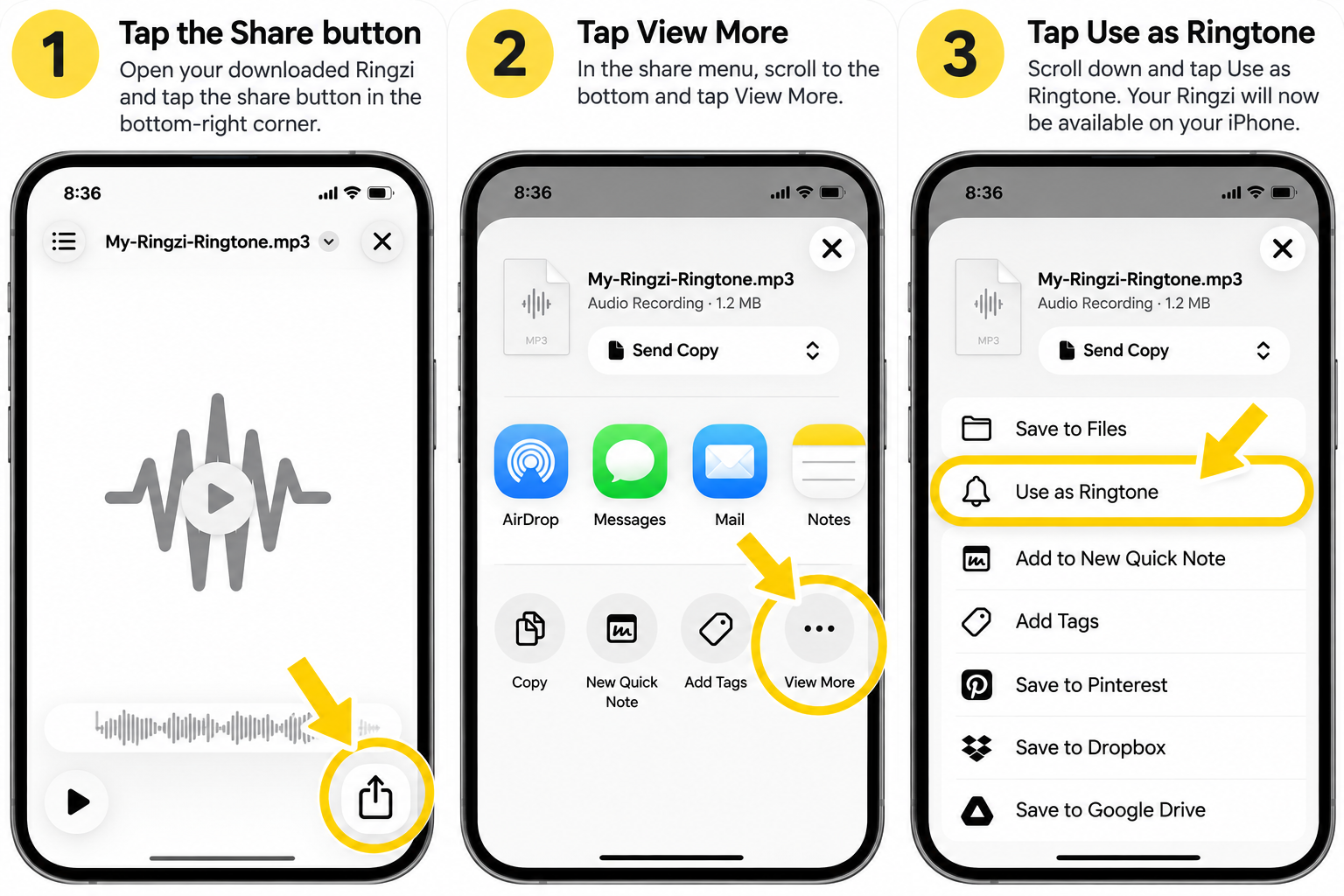
1. Tap Share
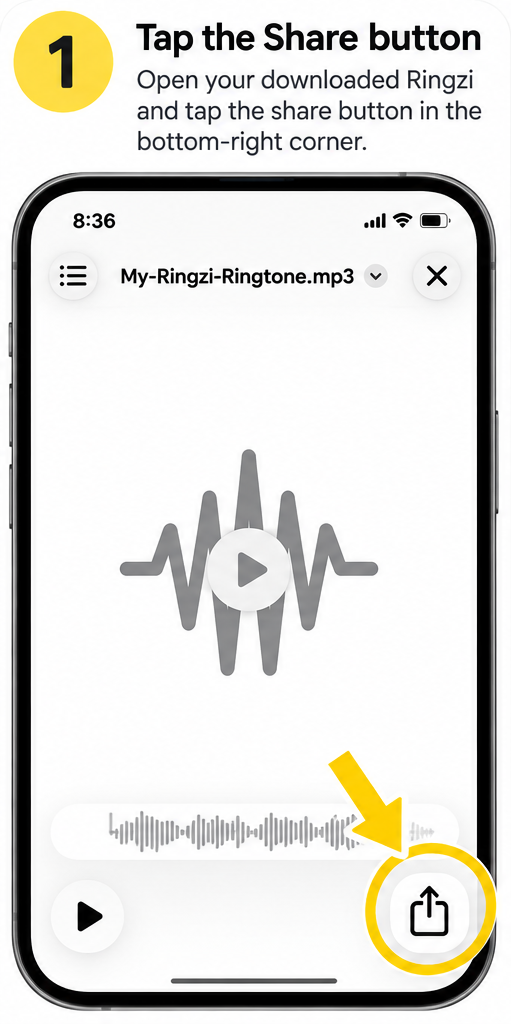
2. Tap View More
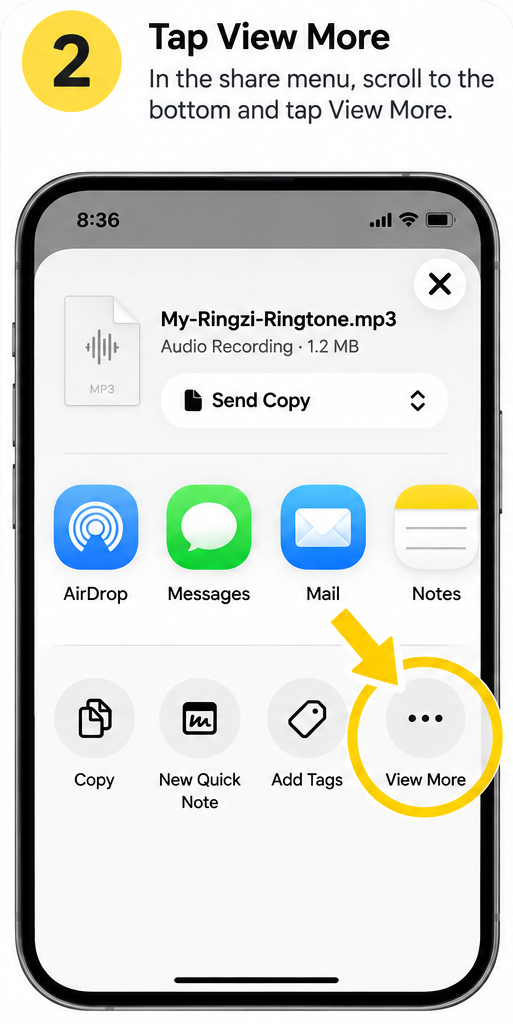
3. Tap Use as Ringtone
That's it 🎉
Your Ringzi is ready to use as your ringtone.
How do I add a Ringzi Alert Tone on iPhone?
Once you've tapped Add to iPhone on your Alert Tone:
Add your Alert Tone to iPhone
1. Import your Ringzi
Open your Ringzi, tap the Apple Share button and choose Use as Ringtone.
Don't worry — Apple will temporarily make this your ringtone. We'll change it back in Step 3.
2. Make it your Text Tone
Go to Settings → Sounds & Haptics → Text Tone, find your Ringzi (usually near the bottom) and tap it.
3. Change your ringtone back
Go to Settings → Sounds & Haptics → Ringtone and choose your normal ringtone again.
Done 🎉
Your normal ringtone is back and your Ringzi is now your Text Tone.
My Alert Tone isn't showing on my iPhone. What do I do?
First make sure you imported it with Use as Ringtone — just saving it to Files isn't enough for Text Tone to see it. If it still isn't showing, you can add it with Apple's free GarageBand app instead.
If your Ringzi isn't showing in Text Tone
You can add it using GarageBand:
- Open GarageBand and import your downloaded Ringzi.
- Tap Share.
- Choose Ringtone.
Don't worry — Apple calls this a Ringtone export even though we're going to use it as an Alert Tone.
- Tap Export.
- When the export finishes, tap Use sound as…
- Choose Standard Text Tone.
Your Ringzi should now be set as your text alert sound.
⚠️ Don't choose “Standard Ringtone” — that would change your incoming call ringtone.
No “Use sound as”? Go to Settings → Sounds & Haptics → Text Tone and select the exported Ringzi there.
Get GarageBandHow do I set my Ringzi Wallpaper on iPhone?
Tap Save Wallpaper and save your Ringzi to Photos, then:
- 1
Save to Photos
Save your Ringzi Wallpaper to Photos.
- 2
Open & Share
Open it in Photos and tap the Share button in the bottom-left.
- 3
Use as Wallpaper
Scroll down and tap Use as Wallpaper.
- 4
Tap Add
Position your Ringzi if needed, then tap Add in the top-right.
- 5
Set as Wallpaper Pair
Choose Set as Wallpaper Pair. This sets your Ringzi as your Lock Screen and keeps your existing Home Screen apps exactly where they are.
- 6
See your Ringzi
Lock your iPhone and wake the screen to see your new Ringzi Wallpaper. ✨
Your Ringzi appears on your Lock Screen and behind your existing Home Screen apps — no need to rearrange anything.
How do I set a Ringzi Wallpaper on Android?
Tap Save Wallpaper, open the saved image, then choose menu/options → Set as wallpaper. Menu names vary by phone.
How do I add a Ringzi as my ringtone on Android?
Once you've downloaded your Ringzi:
- Open Settings
- Go to Sounds & vibration or Sound
- Tap Phone ringtone or Ringtone
- Choose your downloaded Ringzi
- Tap Save or Done if required
Your Ringzi is now your ringtone 🎉
Android menu names vary slightly between Samsung, Google Pixel and other phones. If your Ringzi isn't shown, look for Add ringtone, +, or My Sounds, then select your downloaded Ringzi file.
How do I add a Ringzi Alert Tone on Android?
Add your Alert Tone to Android
- Your Alert Tone saves to Downloads
- Open Settings → Sound & vibration → Notification sound (or Default notification sound)
- Tap + / My Sounds and pick your Alert Tone
Menu names differ between phones. For texts only, open your Messages app → Settings → Notifications → Sound.
How do I set a Ringzi for just one person on iPhone?
Once you've added your Ringzi to your iPhone, you can set it to play only when a specific person calls.
- Open Contacts
- Choose the person you want
- Tap Edit
- Tap Ringtone
- Select your Ringzi
- Tap Done
That's it. Your Ringzi will now play when that person calls, while everyone else will continue to use your normal ringtone.
This is perfect for personalised Ringzis like “Dave is calling” or “The wife is calling”.
How do I set a Ringzi for just one person on Android?
Once you've downloaded your Ringzi to your Android phone, you can assign it to a specific contact.
- Open Contacts
- Choose the person you want
- Tap More or the three-dot menu
- Tap Set ringtone or Change ringtone/vibration
- Select your Ringzi
- Tap Save
That's it. Your Ringzi will now play when that person calls, while everyone else will continue to use your normal ringtone.
Android menu names can vary slightly depending on the phone.
On some phones, including Samsung Galaxy devices, if your Ringzi isn't shown in the ringtone list, tap the + or Add option and select the downloaded Ringzi file.
More questions
What is Ringzi?
Ringzi creates custom AI ringtones, alert tones, wallpapers and widgets from the descriptions you write.
Describe the music, sounds, voice, name or inside joke you want. Preview, install, download and share your finished Ringzi.
Are my first Ringzis free?
Yes. New accounts get 2 free Ringzis. You can make ringtones, alert tones or one of each — no credit card required.
If you made a Ringzi before signing up, that counts as your first free one. Creating another version uses your remaining free Ringzi.
What is Ringzi Unlimited?
Unlimited AI creation for $4.99/month, or $39.99/year (save 33%). Cancel anytime.
Ringzi Unlimited is subject to our fair-use policy. If you bought AI Credits before, they still work.
Can I send a Ringzi to a friend?
Yes. Share any ringtone, alert tone, wallpaper or widget to send them a link. They can play and download it without an account, then make their own Ringzi.
How do I create a Ringzi?
Choose Ringtone, Alert Tone or Wallpaper, then describe what you want — music, sounds, spoken words or the picture you imagine. Ringzi detects voice ideas automatically, and you can edit the line and voice style before creating.
When it's ready, preview it and use the install, download or share controls.
Can Ringzi say someone's name?
Yes. Include the name and the words you want spoken in your description.
For example: “Heavy rock guitar followed by a voice shouting, Rob, your phone is ringing!”
What voices can I use?
Ringzi offers original character voices such as a movie narrator, sports commentator, robot or newsreader.
It does not imitate celebrities or other real people.
What can I create?
Create original music hooks, engines, animals, funny sounds, cinematic intros, retro game sounds, sports moments, voices, alarms or combinations of them.
Add a name, personal message or inside joke to make it yours.
Can I use my own voice or audio?
Yes. Record yourself directly in Ringzi or upload your own audio. Use it as-is, or let Ringzi add music and effects to turn it into something completely unique.
Only upload audio you own or have permission to use.
Your recordings and uploads stay private to your account unless you choose to share them.
Can I copy a song or famous artist?
Ringzi is designed for original creations. Do not ask it to copy a commercial recording, protected song or a particular artist's voice.
Instead, describe broad qualities such as “upbeat 80s rock”, “retro disco” or “cinematic orchestra”.
Can I share a Ringzi?
Yes. Use Share on a completed Ringzi or in My Ringzis. On mobile, Ringzi opens your phone's share menu; on desktop, it copies a sharing link.
Anyone with that link can play and download the shared Ringzi.
Where are my Ringzis saved?
Sign in and open My Ringzis to play, install, download, share, remix or delete your ringtones, alert tones, wallpapers and widgets from any device.
What happens if creation fails?
A failed creation never counts — not against your free Ringzis, your credits or your Unlimited allowance.
Can I delete a Ringzi?
Yes. Open My Ringzis and use Delete on a creation you no longer want.
Deleting a Ringzi does not give back the creation used.
Does Ringzi work on desktop?
Yes. You can create, preview, download and share Ringzis in a supported desktop browser.
Scan the QR code in the installation panel to open your finished Ringzi on your phone.
Still need help?
Email support@ringzi.app and tell us your phone type if it's an installation question.
Contact Ringzi support